Holman Insights
- 4.4
- Rating
- 50.00K
- Installs
- Free
- Price

 Analysis by App-foxy
Managing a vehicle usually means jumping between reminders, paperwork, fuel notes, mileage records, and service information. Holman Insights brings those vehicle-related details into one place for people whose cars are connected to Holman. I found it most useful as a practical reference point rather than an app I would open for entertainment or daily driving directions.
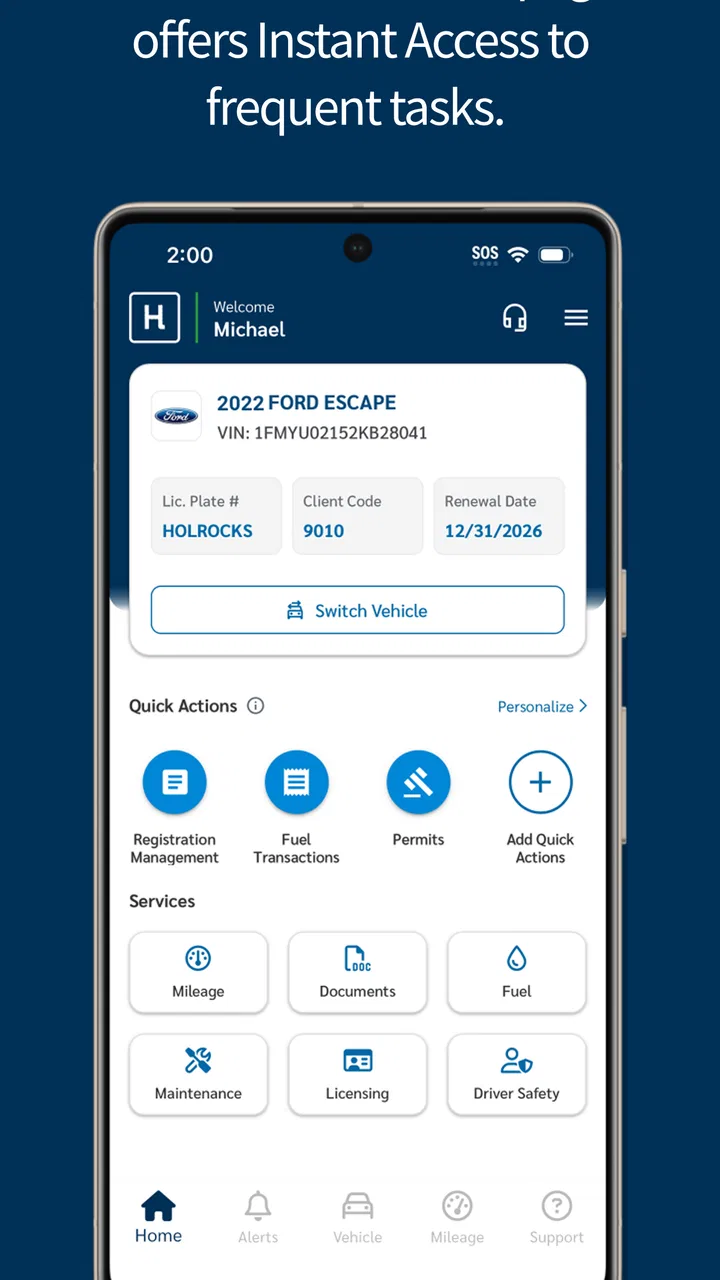
That distinction matters. This is an Auto & Vehicles app from Holman, offered free of charge and rated for Everyone. Its purpose is focused: helping users access information connected with a Holman vehicle, including mileage, maintenance, licensing, fuel, and orders. It is not trying to replace a navigation app, a mechanic’s diagnostic tool, or a general expense tracker.
What Holman Insights is really useful for
The strongest part of the experience is the way it groups several ownership or fleet-management tasks around the vehicle itself. Instead of keeping a fuel note in one app, a service reminder in a calendar, and order information in an email thread, I can use the Holman account as the starting point for checking what needs attention.
You May Also Like

 Google Keep - Notes and lists
Google Keep’s Quiet Growth Shows the Appeal of Simpler Notes
As mobile work gets busier, Google Keep keeps winning a simple contest: capture a thought quickly, find it later, and get on with the day.

 Blood Strike: 2.5 Anniversary
Blood Strike’s Loadouts Turn Every Drop Into a Tactical Gamble
A close look at Blood Strike’s custom loadouts: how fast access to signature weapons reshapes its battle royale rhythm, rewards preparation, and narrows the gap between fights.

 Pandora - Music & Podcasts
Pandora’s Music Is Easy to Start, but Harder to Recover
Pandora’s strength is its low-effort path from a seed to a station. Its weak spot is how much confidence it asks you to place in connection, setup, and quiet recovery.

 8 Ball Pool
 Is Built on Rivalries, Rematches, and Routine
A close look at the rivalries, rematches, shared routines, and unanswered safety questions that turn a quick pool match into a persistent mobile community.

 Samsung Music
’s Quiet Strength Is Playing What You Already Own
Its reach comes less from spectacle than from dependable access to a personal library. That simplicity is both the app’s strongest retention engine and its ceiling.

 AccuWeather: Weather Radar
AccuWeather Review: A Quick, Clear Forecast for Everyday Decisions
For everyday plans, the best forecast is the one you can understand quickly. AccuWeather makes rain timing, radar, and local conditions easy to act on, with a few trade-offs.
More From Our News Desk



That is especially helpful when the vehicle is part of a company arrangement or a managed fleet. In that situation, mileage and licensing are not just personal notes. They can affect reporting, maintenance planning, and whether the right person knows about an upcoming requirement. Having those subjects presented together makes the app more relevant to drivers who need to stay aligned with an organization.
For a private driver with a single car, the value depends more on whether the vehicle is actually supported through Holman. If it is, the app can reduce the need to search through old messages or paperwork. If it is not, installing it simply to track ordinary fuel spending or service dates would be difficult to justify, because many general vehicle apps already handle those tasks without a Holman connection.
A sensible first setup
When I approach an app like this, I prefer to begin with the minimum information needed to make it useful. I would sign in, check that the vehicle details and mileage context look correct, and then explore each area separately rather than immediately entering every possible detail. This makes it easier to spot a wrong vehicle association or an incomplete record before relying on the app.
The first useful check is the mileage area. I would treat it as the baseline for future maintenance conversations, not merely as a number to glance at. If the displayed mileage does not match the vehicle, I would pause before using it for planning. A small mismatch can make a service reminder or usage report less helpful later.
The maintenance section is more valuable when checked before a trip or before handing a vehicle to another driver. I would use it to understand what information is already recorded and what still needs attention. The app is best viewed as a shared reference, not as permission to ignore warning lights, manufacturer instructions, or advice from a qualified technician.
Where trust comes from in this kind of app
Vehicle information can be surprisingly sensitive. Mileage may reveal how much a person drives, fuel records can show routines, and licensing or order details may connect a driver with an employer or a vehicle provider. That makes trust less about attractive design and more about whether the user can understand what is being shown and control their account responsibly.
My cautious approach is to use only the account and vehicle information needed for the task at hand. I would avoid treating the app as a private diary of every journey, particularly when the purpose is simply checking maintenance or licensing information. The more personally detailed the record becomes, the more important it is to review account access and avoid leaving a signed-in session on a shared device.
The developer is Holman, which gives the app a clear connection to the vehicle service context it presents. That connection is useful because the information is organized around a Holman vehicle rather than around generic manual entries. At the same time, the connection means the app is not a universal dashboard for every car a person might own.
Controls and choices I would check before relying on it
Before using the app regularly, I would look carefully at the sign-in process, account settings, and any visible choices presented during setup. I would also check whether the app keeps me signed in and whether there is an obvious way to sign out when using a shared phone. These are small details, but they matter when an account contains vehicle, order, licensing, or fuel information.
I would also review the device’s permission controls rather than accepting prompts automatically. A permission should make sense for the task the app is performing. If a request appears unrelated to checking vehicle information, I would stop and investigate it through the operating system settings or Holman’s own support channels before continuing.
This is not a criticism of a specific permission. It is simply the right habit for any app connected to personal or work-related records. The important point is that users should make deliberate choices instead of assuming that every request is necessary.
The app runs on Android devices using version 8.0 or later, and the current version is 9.0.3. That compatibility range makes it accessible to many existing phones, although I would still keep the operating system and the app updated where possible. Updating is particularly sensible for an account-based vehicle app because it reduces the chance of running an old build when handling important records.
Three moments when the app can save real effort
The first is a pre-trip check for a work vehicle. Before leaving for a longer assignment, I would open the mileage and maintenance areas, confirm that the vehicle record is the expected one, and review any visible service information. This does not replace a physical inspection, but it can prevent the avoidable mistake of discovering an administrative or maintenance issue after the trip has started.
The second is the end of a reporting period. A driver who needs to keep mileage or fuel information organized can use the app as a central place to review the vehicle record before preparing a report. The practical tip is to check entries consistently, rather than trying to reconstruct several weeks of driving from memory. Regular review is more reliable than a rushed catch-up session.
The third is a vehicle handover. When a car moves between drivers or responsibilities, I would use the app to establish what information is already associated with it. That creates a clearer starting point for the next person and can expose discrepancies early. The trade-off is that this only works well when everyone involved understands whose responsibility it is to update or verify the information.
Fuel, licensing, and orders are useful but not interchangeable
One subtle strength is that the app puts fuel, licensing, maintenance, and orders in the same vehicle-focused environment. However, I would not treat these areas as one combined record. Fuel information can help explain usage, maintenance information relates to vehicle condition, licensing is administrative, and orders may concern a separate process entirely.
Keeping those purposes separate helps prevent bad assumptions. For example, a current fuel entry does not prove that a vehicle is ready for a long journey, and a visible maintenance record does not necessarily replace a current licensing check. The app can help me find the relevant information, but I still need to interpret each section according to what it actually represents.
That is also where the app differs from a general car-maintenance tracker. A generic tracker may be better for manually recording repairs across several cars, adding custom notes, or keeping a long personal history. Holman Insights makes more sense when the key requirement is access to Holman-related vehicle information rather than complete customization.
What happens when information looks wrong
If I noticed an unexpected mileage figure, an unfamiliar order, or a licensing detail that did not look right, I would not repeatedly edit entries just to make the screen appear correct. I would first take a screenshot or note the exact issue, then use the relevant Holman support route or account contact connected with the vehicle. That preserves a clear record of the problem.
This is an important workflow because vehicle records can be shared or maintained through an organization. A change made without understanding its source might hide the symptom without fixing the underlying record. My advice is to distinguish between information I am responsible for entering and information that is supplied through the vehicle-management process.
The same caution applies to orders. An order screen can be useful for checking progress or context, but I would avoid assuming that every visible item is something I can modify directly. When an entry relates to another person, a fleet administrator, or a supplier process, the safest choice is to confirm responsibility before taking action.
Everyday privacy habits that make a difference
I would not leave the app open on a phone that other people regularly use. Even without discussing technical data practices, simple account hygiene gives the user more control: use a screen lock, sign out when appropriate, and avoid sharing account credentials through messages or notes.
On a work device, I would also clarify whether the phone belongs to me, my employer, or a fleet provider. That context affects how carefully I should separate personal and work vehicle information. If multiple vehicles or drivers are involved, checking the selected vehicle before submitting or reviewing anything becomes a habit worth building.
Another useful practice is to review the app after changing vehicles or responsibilities. Old vehicle associations can create confusion if they remain visible beside a current car. I would verify the active vehicle before relying on mileage, maintenance, fuel, licensing, or order information, especially after a handover.
Who should use it, and who should skip it
I would recommend Holman Insights to a driver who already has a Holman vehicle connection and wants a single mobile place for vehicle-related records. It is particularly suitable for people who need to check mileage, maintenance, licensing, fuel, and orders without maintaining several separate notes.
It may also suit fleet drivers who value consistency more than customization. The app’s usefulness comes from its connection to the vehicle-management context, so it can be more practical than a blank spreadsheet when the required information is already organized through Holman.
I would skip it if I wanted a broad car-management app for unrelated vehicles, detailed repair journaling, route planning, or a fully personal fuel-budget system. A navigation app is better for directions, a budgeting app is better for household spending, and a mechanic’s diagnostic tool is better for interpreting vehicle faults. Installing this one as a replacement for all three would lead to disappointment.
How the free model affects the decision
The app is free, which removes the main financial barrier to trying it. That is useful for a driver who is unsure whether the Holman connection will fit into their routine. I would still judge it by the time it saves, not simply by the fact that there is no purchase price.
A free app can be worthwhile if it prevents repeated searches through paperwork or reduces uncertainty before a vehicle handover. It is less worthwhile if I have no Holman vehicle information to access or if I already maintain accurate records in a system that everyone involved uses consistently.
Its Everyone content rating also makes it broadly approachable from an age-classification perspective. That does not remove the need for sensible account handling, particularly when the vehicle belongs to a workplace or when the displayed information could identify a driver’s responsibilities.
Adoption and practical confidence
The app has an average rating of 4.3 from around 1.7 thousand ratings, with over 50 thousand installs. Those figures suggest that it has found a real audience, but I would not use popularity as proof that it fits every Holman user. The better test is whether the vehicle appears correctly and whether the sections I need are useful in my specific situation.
There are also 129 written reviews, which can be helpful when looking for recurring user concerns or device-specific friction. I would read those with care, separating problems related to sign-in or account setup from complaints about vehicle records that may depend on an organization’s process. In an account-connected app, not every problem is caused by the mobile interface itself.
Because the app has been available since January 4, 2017, it is not a brand-new experiment. Still, long availability does not guarantee that every workflow will feel modern or equally smooth on every phone. I would give the setup a short trial before making it the only place I rely on for important reminders or records.
My cautious verdict
Holman Insights is a focused tool, and that is both its advantage and its boundary. I like the idea of having mileage, maintenance, licensing, fuel, and order information connected to the vehicle rather than scattered across unrelated apps. For the right Holman user, that can make ordinary administrative tasks easier and reduce the chance of overlooking a detail.
My recommendation comes with a condition: treat it as an access point to vehicle information, not as an automatic guarantee that every record is complete or current. Check the selected vehicle, review account controls, question unexpected entries, and keep safety-critical decisions grounded in the vehicle itself and qualified advice.
If you already manage a Holman vehicle, the free app is worth trying because its purpose is specific and its compatibility is reasonably broad. If you need a universal driving companion, a customizable maintenance log, or a private expense tracker, I would choose a different category of app. The best reason to use Holman Insights is not that it does everything; it is that it puts the Holman-related information you actually need closer at hand.
FAQs for Holman Insights
01What is Holman Insights and how does it work?
Holman Insights is a comprehensive app designed to provide users with detailed analytics and insights about their vehicle fleet. It works by collecting data from your vehicles and presenting it in an easy-to-understand format, helping fleet managers make informed decisions to enhance efficiency and reduce costs.
02Is Holman Insights compatible with all vehicle types?
Holman Insights is compatible with a wide range of vehicle types, including cars, trucks, and vans. However, for optimal functionality, it's recommended to check the specific compatibility of your vehicle model with the app’s requirements to ensure seamless integration and data accuracy.
03What features does Holman Insights offer to enhance fleet management?
Holman Insights provides an array of features such as real-time vehicle tracking, fuel consumption analysis, maintenance scheduling, and driver behavior monitoring. These features are designed to streamline fleet operations, reduce expenses, and improve overall vehicle and driver performance.
04Is there a subscription fee for using Holman Insights?
Yes, Holman Insights typically requires a subscription fee, which may vary based on the size of your fleet and the level of service you choose. It’s advisable to review the pricing structure on their official website or contact their support team for detailed information on available plans.
05How secure is the data collected by Holman Insights?
Holman Insights prioritizes data security by implementing robust encryption and privacy protocols to protect user information. The app complies with industry standards to ensure that all data collected and transmitted is secure, giving users peace of mind regarding their fleet's sensitive information.
Pros
- User-friendly interface for easy navigation.
- Real-time analytics enhance decision-making.
- Customizable dashboards for personalization.
- Seamless integration with existing systems.
- Comprehensive data visualization tools.
Cons
- Limited offline functionality limits access.
- Requires a stable internet connection.
- Occasional lag with large datasets.
- Initial setup can be time-consuming.
- Advanced features require a learning curve.

Holman Insights
Gallery